Piano practice

A clearer way
to practice.

Maestro is a music-learning companion designed for Meta display glasses. Get visual guidance as you play, then a focused review of what to work on next.

A product concept for Meta Ray-Ban Display.

Piano keys in warm light
Maestro A practice companion
01 / How Maestro works

Guidance while you play.

Maestro is designed to use the camera and microphone on Meta display glasses to help you understand what to improve as you practice. Visual cues and short demonstrations appear in a corner of your view, keeping your instrument in sight. This piano concept follows a left-hand shift from G♯ to A♯, slows the movement down for a closer look, and ends with a session review that turns the difficult moment into a focused drill.

Concept walkthrough 26 seconds · Silent video
  1. Find the next move

    A visual cue highlights the shift from G♯ to A♯ while the piano stays in view.

  2. See it more slowly

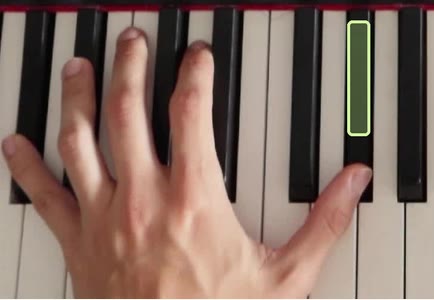
    A half-speed replay shows the hand movement and where the thumb should land.

  3. Leave with a plan

    The session review revisits the shift and suggests three slow repetitions before trying the phrase again.

02 / Practice notes

After practice

Revisit the left-hand shift from the glasses demo and see what to practice next.

maestro. PIANO / SESSION REVIEW
Example review

Practice the shift
on its own.

Left hand / G♯ to A♯

Keep your thumb ready for the landing. Practice the move slowly three times.

Next drill

Isolate the two thumb positions.
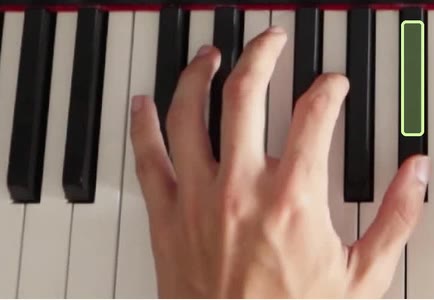
Left hand at the start of the shift, with G sharp highlighted
01 Start positionG♯
Left hand after the shift, with A sharp highlighted
02 LandingA♯
01 / Start position

Start with your thumb on G♯.

Find the first key before practicing the shift.

Illustrative coaching feedback

What gets in the way when you practice?

Tell us how you learn an instrument and what you’d like Maestro to help with.